Germany · DHL, Hermes and DPD
Manage every parcel — from the code to the receipt.
A return or a parcel of your own: PaketQR keeps the return label a merchant sends you just as it keeps the postage you bought yourself — a DHL Paketmarke, a Hermes mobile parcel stamp, a DPD label. It shows the code large and bright at the parcel shop, reminds you of the deadline, and keeps the posting receipt afterwards.
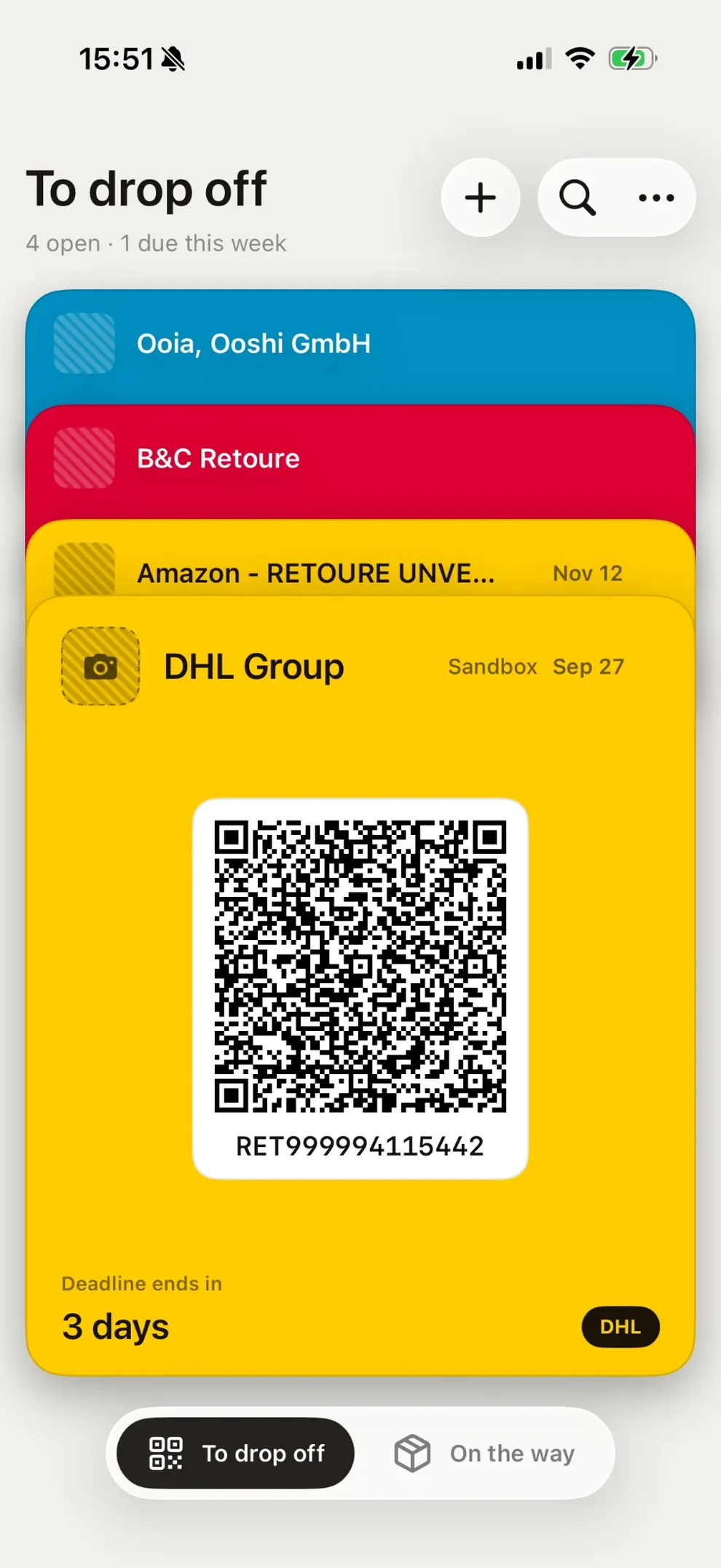
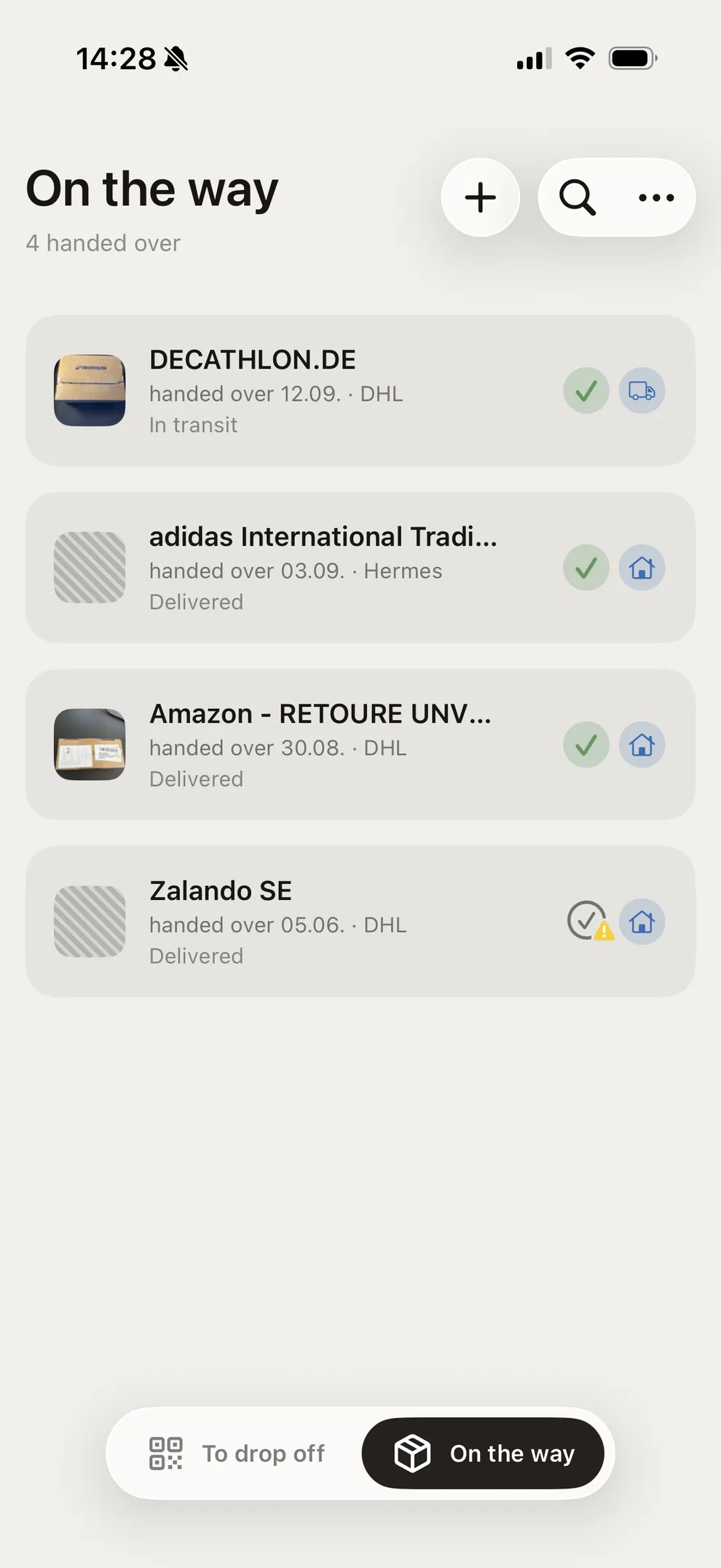
Two lists
To drop off, and on the way.
A parcel waits in the first list until it is handed over. Then it moves to the second, with the receipt on file and the carrier’s history beside it.
Getting a parcel in
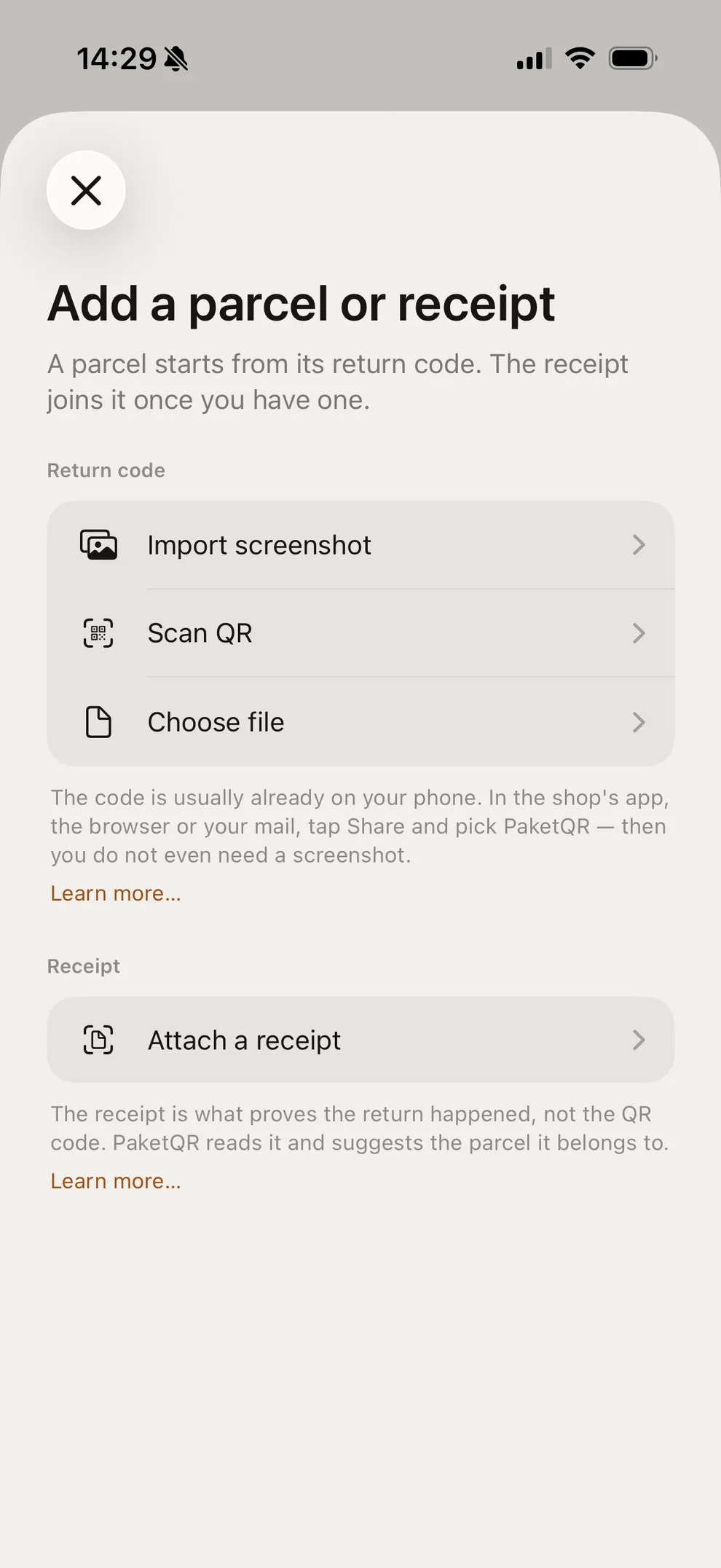
Four ways in, and nothing to type.
The code is read on the iPhone. The recipient, the tracking number, the carrier and the deadline are all in the code itself. Every import first shows what was read and waits for you to confirm it.
- Share from wherever the code is: the shop’s app, the browser or your mail
- A screenshot from your photo library
- The camera
- A PDF label you already saved
Making it yours
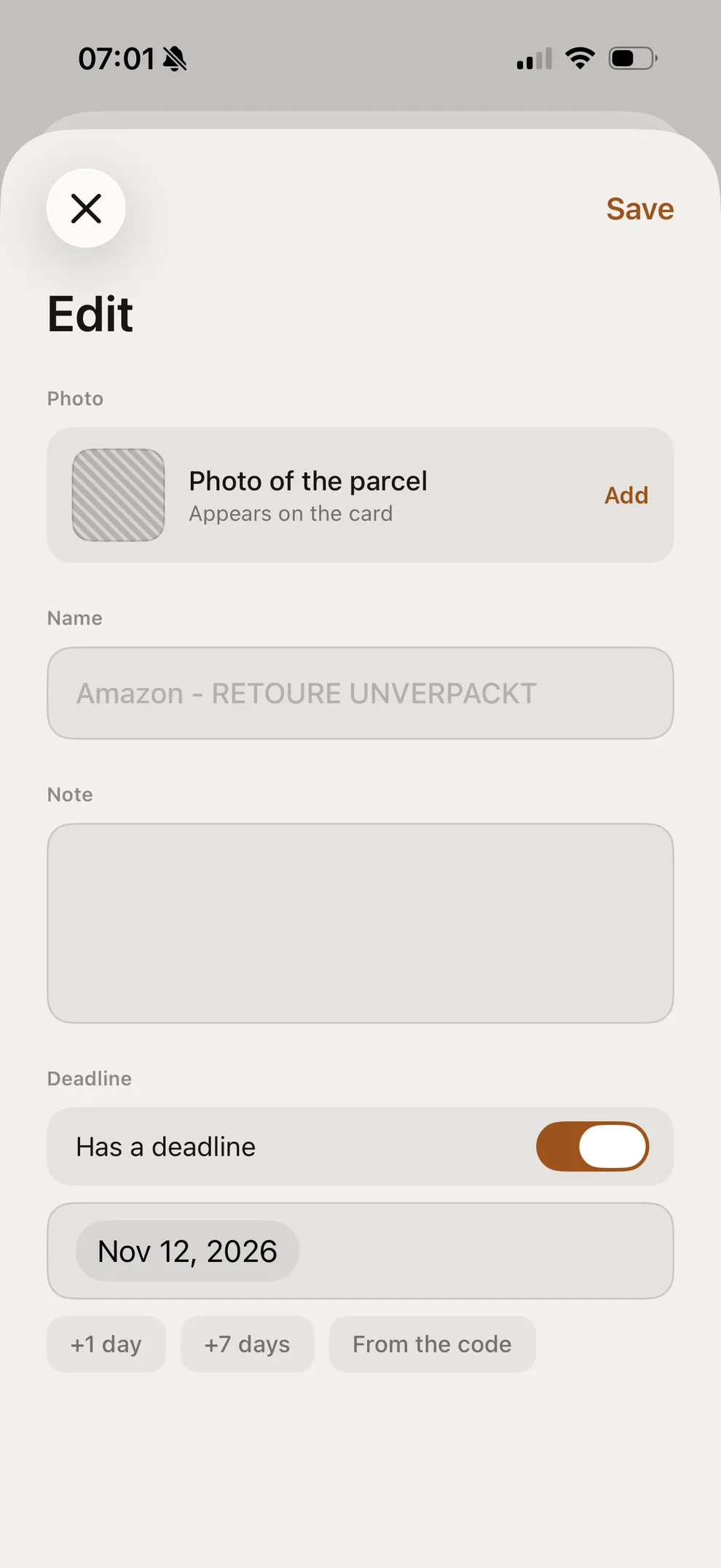
Rename it, note what is inside, set your own deadline.
What the code says is only the start. Give the parcel a name you will recognize, add a photo of the box so you can tell it apart at the counter, write a note — and move the deadline by a day, by a week, or back to the date the code itself stated.
At the counter
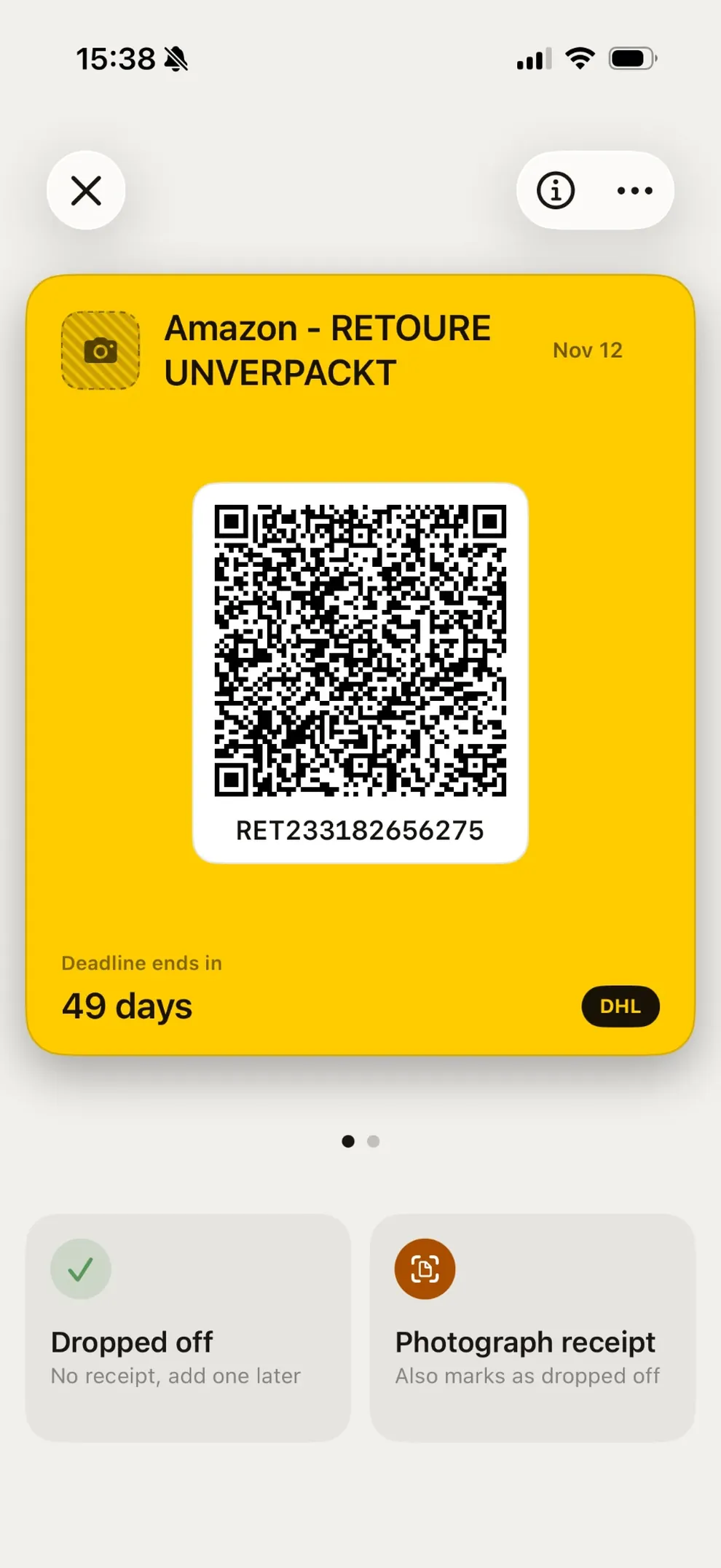
One tap, ready to drop off.
Full brightness, the display kept awake. Below it are the tracking number and, where the code carries one, the number for typing in. A failed scan is a nuisance, not a dead end.
Around the drop-off
Deadlines, the calendar, and finding a parcel again.
Reminders
The deadline is read from the code where the code states one. Seven days before, two days before and on the last day — made on the iPhone, needing no connection, each one switchable on its own.
Calendar
A calendar entry as well, if you want one. PaketQR has write-only calendar access, and you decide whether the event names the merchant.
Search
Names, merchants, tracking and receipt numbers, the reference, the drop-off point, notes and dates match across open and archived parcels — that much is free. The app reads your item photos on the iPhone either way: the text on a label, the colors, the objects in the picture. Pro is what lets you search it, so “blue sweater”, “Nike” or “article 1234” find the parcel.
The receipt
What proves the parcel was handed over is the receipt, not the QR code.
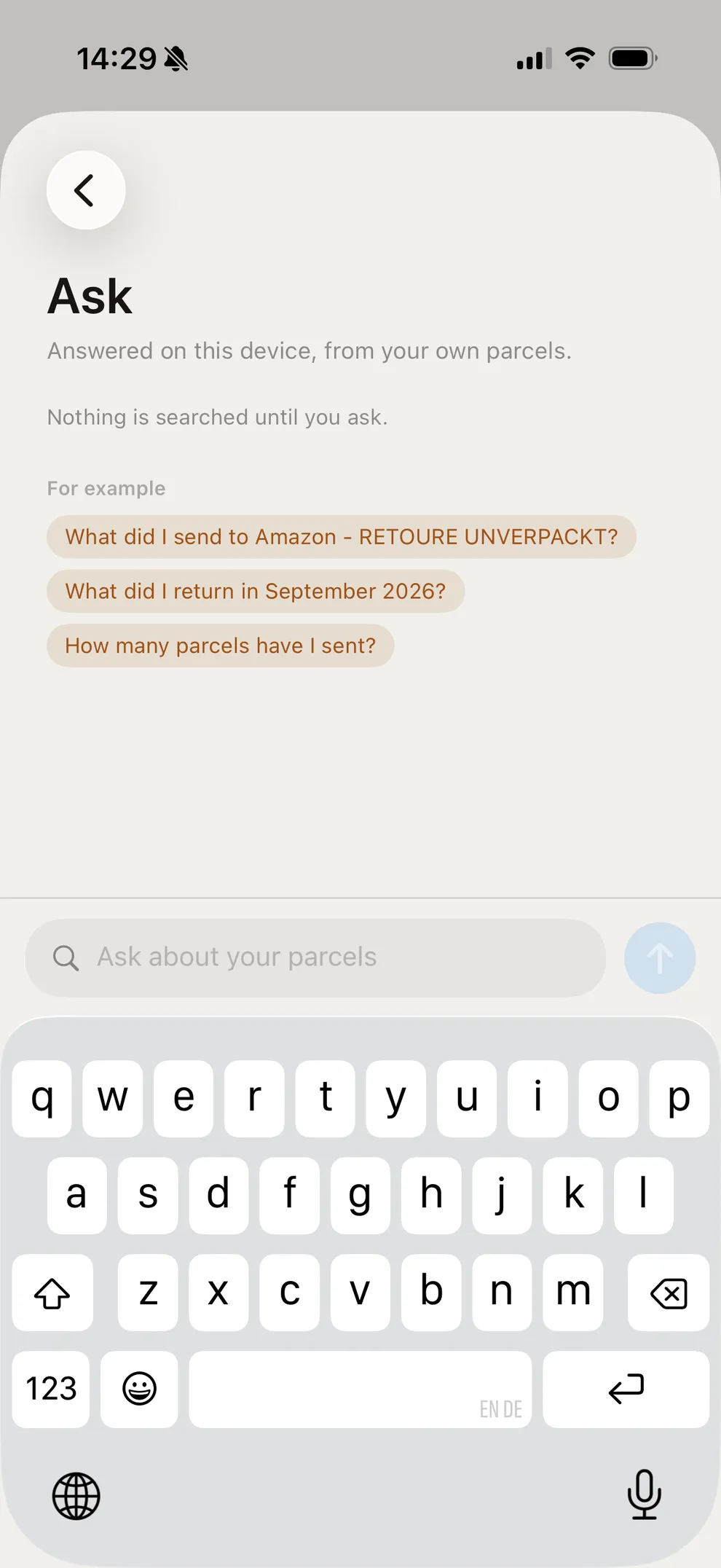
Photograph the posting receipt right there at the counter. The app reads the shipment numbers on it, matches it to the right parcels — including when one receipt covers several — and takes the printed hand-over time from it. The photo is stored unchanged.
Proof as a PDF
For any parcel you handed over, a document a merchant, an arbitration body or a lawyer can read without the app. At each export you decide again whether the addresses, the photos and the carrier’s history go in. The PDF is part of Pro. If it is all you need, the Evidence Export unlocks it on its own, as a smaller one-time purchase.
Ask Pro
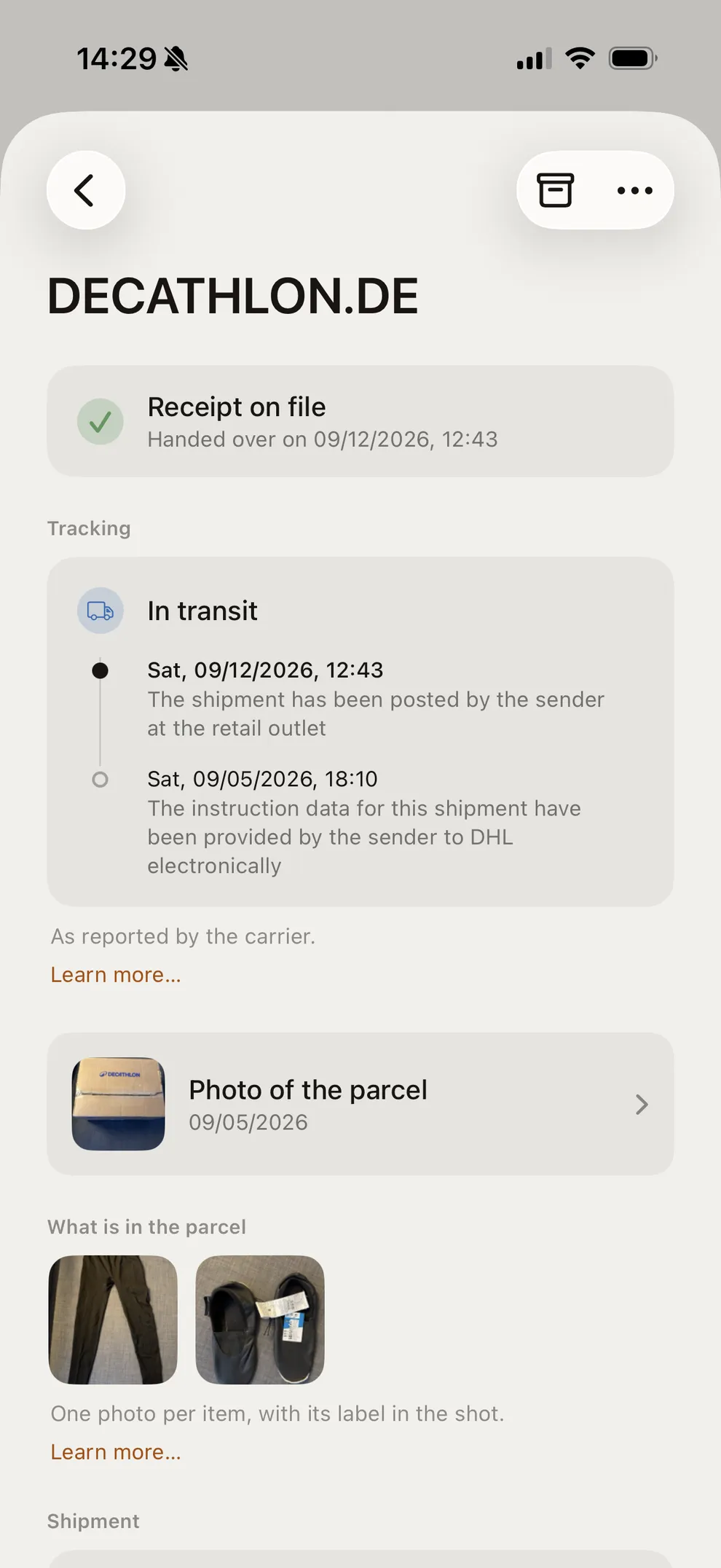
Answered on your iPhone, from your own parcels.
On iPhones with Apple Intelligence, Ask mode answers whole questions — what you sent back to a given merchant, what went out to buyers last month, how many parcels there were in all. It reads the same photo index Pro search uses, so what is in a picture counts as much as what you typed. Nothing is searched until you ask, and the question itself is read on the iPhone by Apple’s own model rather than sent anywhere.
Tracking
Free opens the carrier’s page. Pro follows the parcel for you.
Every parcel keeps its tracking number and a link that opens it at DHL, Hermes or DPD. PaketQR itself sends nothing to its own server for that; opening the carrier’s page does hand the tracking number to the carrier’s website. Pro follows the parcel for you instead: PaketQR asks the carrier through a server this project runs, sends you each change, and keeps the whole history in the app for as long as you choose. A request carries the tracking number and the carrier; some also carry an anonymous key generated on your iPhone, and push notifications need a push token. No name, no address. All of it can be switched off.
Privacy
A shipping label carries your full name and home address in clear text.
That is the reason the app is built the way it is. No account, nothing to sign in to, no third-party SDKs, no transmitted analytics. iCloud sync is on by default and runs in your own iCloud; the name and address from the code are encrypted on the iPhone first. Privacy mode switches off, in one go, everything the app can disclose about a parcel.
PaketQR Pro
What the app does for nothing, and what Pro adds.
Free
- Every code the app reads, both lists, no account
- Deadlines, reminders and the calendar entry
- The posting receipt, photographed and matched to the parcel
- Up to ten item photos on a parcel, added before you drop it off and kept for as long as the parcel is
- Search across names, merchants, tracking and receipt numbers, the reference, the drop-off point, notes and dates
- The tracking number, and a link that opens it at the carrier
- The complete export of your data — every parcel, receipt and photo in one ZIP
Pro
- Automatic tracking: the app follows the parcel, sends you a notification for each change, and keeps the whole history for as long as you choose
- Search inside your item photos: the text on a label, the colors, the objects in the picture — so “blue sweater”, “Nike” or “article 1234” find the parcel
- Evidence PDFs without counting them — one from the parcel screen, or one per parcel for a whole selection at once
- Ask, for whole questions across your parcels
- Advanced export: filtered by date, carrier and status, with the columns you choose, as CSV and Excel — plus an evidence PDF per parcel and every deadline as a calendar file if you want them
- Shared codes, receipts and evidence PDFs without the PaketQR line
Pro is a one-time purchase inside the app, not a subscription, and it applies on every device signed in to the same Apple Account. If the evidence PDF is all you need, there is the Evidence Export instead: a smaller one-time purchase that unlocks just that. Pro includes it, but not the reverse — buying the Evidence Export first and Pro later means paying Pro’s full price. Nothing you have already put in the app goes away without Pro.
Questions
The ones that come up most.
Can I use PaketQR without paying?
Yes. The free version covers everything sending a parcel needs, for returns and your own parcels alike, and everything that counts as evidence afterwards: importing and showing codes, the tracking number, deadline reminders, photographing the posting receipt, photos of the items you packed, and the complete export of your data.
Pro adds automation and organization, for people who send more parcels or who want more out of what they have already saved.
What does PaketQR Pro add?
Pro is about convenience, organization and automation — not about locking away your own parcel information.
It adds automatic tracking with notifications and the whole history; search inside your item photos; evidence PDFs, one at a time or for many parcels at once; Ask; the advanced export; and shared codes, receipts and PDFs without the PaketQR line.
What you saved while using the free version stays yours.
Why photograph the items inside the parcel?
Because a photo answers a question that turns out to matter: what exactly went into this parcel?
That is worth having when several similar parcels go out around the same time, when one order goes back in parts, when a buyer complains, or when a missing refund has to be discussed weeks later.
Taking those photos and keeping them is free, and so is what the app reads out of them on the iPhone: the text, the colors and the objects in a picture. What Pro adds is the search over that, so a parcel can be found again by what is in the picture.
What is an evidence PDF?
A document built from what is already stored for a parcel, for someone who does not have the app — a merchant, a buyer, a support team, an arbitration body, a lawyer.
It can carry the parcel and tracking details, the recorded hand-over, the posting receipt, selected photographs and, if you want it there, the carrier’s history.
You decide what goes in each time you make one.
Do I need an account?
No. There is no account and nothing to sign in to.
Your parcels are stored on your iPhone and, while iCloud sync is on, in your own iCloud. Sending a parcel never depends on registering anywhere.
Three carriers, two lists, no account.
Returns and parcels you post yourself. Germany only, with DHL, Hermes and DPD today.